
Childcare centres in Singapore can now get ECDA grant support for an interactive whiteboard. Under the Early Childhood Digitalisation Grant (ECDG), licensed preschool operators can claim funding for touch-enabled boards that meet a set of minimum specifications.
This guide explains what the ECDA grant interactive whiteboard requirements are, how childcare centres use these boards day to day, and why New Wave Display recommends the Hikvision WonderHub Select Series, which exceeds the key requirements.
Quick answer: An interactive whiteboard qualifies for the ECDA grant if it has at least 40 touch points, 4GB RAM, 32GB storage, built-in speakers, Wi-Fi, Bluetooth, USB and HDMI, and runs Android or Windows. The Hikvision WonderHub Select Series offers 50 touch points, 8GB RAM (plus up to 16GB virtual RAM), 128GB storage and Google EDLA certification.
What is an interactive whiteboard for childcare centres?
An interactive whiteboard is a large touchscreen display that children and educators control with their fingers or a stylus. It replaces a traditional whiteboard, projector and computer with one all-in-one screen.
In a childcare centre, it does two jobs. It is a learning tool, where children draw, play matching games and explore videos by touch. In infant care, it can also act as an infant bay board, showing real-time routine care updates that carers record directly on the screen.
Is an interactive whiteboard eligible for the ECDA grant?
Yes. Interactive boards are an approved equipment category under the Early Childhood Digitalisation Grant (ECDG), which sits under the Productivity Solutions Grant (PSG).
Here is what childcare operators should know:
- Who can apply: ECDA-licensed preschool operators in Singapore.
- What it covers: Interactive Boards for Care Data & Learning, a new equipment category under ECDA’s Industry Digital Plan 2.0.
- How funding works: The grant is paid on a reimbursement basis, after you buy and implement the solution.
- Choice of supplier: There are no pre-approved vendors for equipment. Operators can choose any supplier whose board meets the required specifications.
Because the supplier is your choice, the specification sheet is what matters most. Always confirm the latest support level on the ECDA website before applying.
What specifications does the ECDA grant require for an interactive whiteboard?
The PSG Interactive Board listing sets mandatory minimum specifications. The Hikvision WonderHub Select Series exceeds the key hardware requirements.
| Specification | ECDA grant minimum | Hikvision WonderHub Select Series |
|---|---|---|
| Touch points | 40 | 50 |
| Memory (RAM) | 4GB | 8GB + up to 16GB virtual RAM |
| Built-in storage | 32GB | 128GB |
| Operating system | Android or Windows, with app installs and updates | Android 16, Google EDLA certified |
| Connectivity | Wi-Fi, Bluetooth, USB, HDMI | Wi-Fi 6, Bluetooth 5.4, 2 x USB-C (100W), 3 x HDMI in |
| Data entry | Text boxes, checkboxes, dropdowns | Supported via Android apps and Google Workspace |
Specifications from the GoBusiness PSG Directory and New Wave Display’s product listing. Contact our team for the full specification sheet of your chosen model.
Why do we recommend the Hikvision WonderHub as an ECDA grant interactive whiteboard?
We chose the WonderHub Select Series because it exceeds the ECDA grant requirements with room to spare, so centres are not buying a board that only just qualifies. Four features stand out.
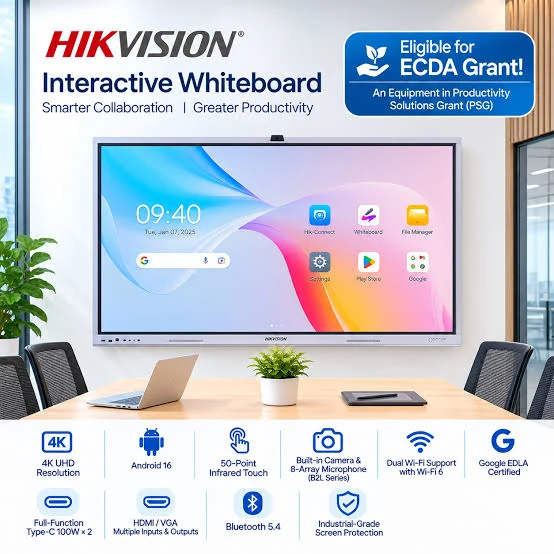
1. Google EDLA certified
EDLA (Enterprise Devices Licensing Agreement) means Google has tested and approved the board’s Android system. Educators get the official Google Play Store, Google Drive, Google Classroom and regular Google security updates. Many lower-cost boards are not EDLA certified, which means no Play Store and apps that must be installed manually.
2. Up to 50-point multi-touch
The board supports up to 50 touch points with smooth, responsive writing. Several children can draw, sort shapes or play a game on the screen at the same time, which suits group activities and circle time.
3. 8GB RAM plus up to 16GB virtual RAM
That is twice the 4GB grant minimum, before virtual RAM. Lessons, videos and learning apps run smoothly, even with several open at once.
4. 128GB built-in storage
Four times the 32GB minimum. Centres can store lesson materials, songs, videos and children’s artwork directly on the board.
Other features that matter in a preschool setting:
- 4K UHD display, clear from the back of the room
- Hardware-level anti-blue light to reduce eye strain
- Two models: A2L (without camera) and B2L (with built-in 8MP AI camera and 8-array microphone for parent meetings and remote sessions)
- Wall mount or mobile stand, so one board can move between classrooms
See full specifications of our interactive whiteboard for childcare centres.
How can childcare centres use an interactive whiteboard?
Childcare centres use interactive whiteboards for learning, care records and parent communication. Common uses include:
- Circle time and group learning: Show stories, songs and videos on a large, bright screen, then let children answer by touch.
- Hands-on activities: Drawing, tracing letters, counting games and shape sorting with fingers or a stylus.
- Infant bay board: Display real-time routine care updates such as feeds, naps and diaper changes, updated by carers on the touchscreen.
- Simple vision checks: The built-in Eye Test tool runs quick vision checks at a three-metre distance using gesture detection.
- Parent updates and meetings: Share children’s work instantly via QR code, or run video calls with parents on the B2L camera model.
- Educator training: Use the same board for staff briefings and training sessions after class hours.
What is WonderOS?
WonderOS is the AI-powered operating system on the Hikvision WonderHub, built for classrooms. It runs on Android and adds education-themed screens, teaching tools and AI features. WonderOS subscription available, contact us for details.
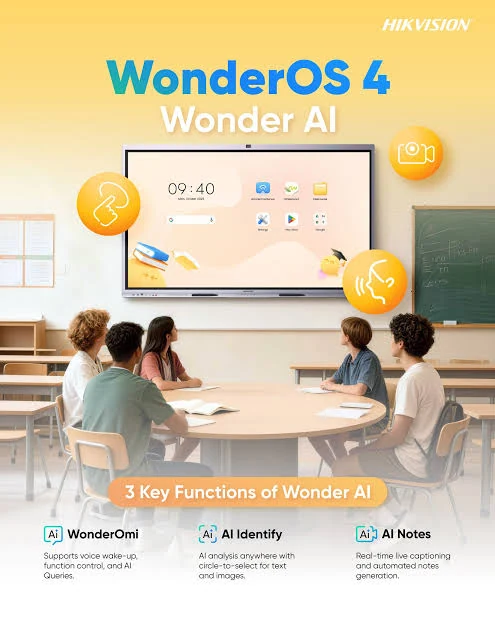
Key WonderOS features for childcare centres:
- WonderOmi voice control: Wake and control the board by voice, hands-free, while managing a class.
- AI Identify: Circle anything on screen to get an instant explanation, search result or example sentences.
- AI Notes: Real-time transcription and smart summaries of lessons or meetings, shared in one click.
- Whiteboard 2.0: An endless canvas with palm rejection, so resting hands do not leave marks. Rough circles, triangles and rectangles turn into neat shapes automatically, and handwriting recognition supports 11 languages.
- Wonder Seminar: Connect up to 9 displays on the same network to share content across rooms.
- Cloud access: Open files from Google Drive or OneDrive, with login by QR code, NFC card or password.
- 20+ built-in tools: Including a timer, piano, annotation tool and the Eye Test app.
Which interactive whiteboard size is best for a childcare classroom?
For most childcare classrooms, a 75-inch or 86-inch board is the best fit. The WonderHub Select Series comes in four sizes:
| Size | Best for |
|---|---|
| 65-inch | Small rooms, infant care bays, reading corners |
| 75-inch | Standard preschool classrooms |
| 86-inch | Larger classrooms and multi-purpose rooms |
| 98-inch | Halls, assembly areas and large group sessions |
If your centre has low wall space or shares one board across rooms, the mobile stand option lets you wheel the board where it is needed. Our team can advise on the right size for each room.
How do childcare centres apply for the ECDA grant for an interactive whiteboard?
The process takes five steps, and the grant is reimbursed after purchase.
- Check eligibility: Confirm your centre is an ECDA-licensed preschool operator.
- Choose a board that meets the specs: Compare models against the mandatory specifications in the PSG Interactive Board listing.
- Get a quotation: Request a quote from New Wave Display for your chosen size, model and installation.
- Submit your application: Apply for the Early Childhood Digitalisation Grant following ECDA’s current guidelines.
- Install and claim: Once the board is installed, submit your claim for reimbursement.
Not sure if your centre qualifies? Contact our team and we will walk you through the requirements.
Frequently asked questions
Can preschools in Singapore get an ECDA grant for an interactive whiteboard?
Yes. ECDA-licensed preschool operators can apply for the Early Childhood Digitalisation Grant (ECDG) under the Productivity Solutions Grant for interactive boards that meet the required specifications.
Do I have to buy an ECDA grant interactive whiteboard from a pre-approved vendor?
No. ECDA does not list pre-approved vendors for equipment. You can choose any supplier, such as New Wave Display, as long as the board meets the mandatory specifications.
What does EDLA certified mean on an interactive whiteboard?
It means Google has certified the board’s Android system. You get the official Google Play Store, Google apps such as Drive and Classroom, and Google security updates.
How many children can use the board at once?
The Hikvision WonderHub Select Series supports up to 50 touch points, so several children can draw or play on the screen at the same time.
Does WonderOS require a subscription?
A WonderOS subscription is available. Contact us for details.
Which sizes are available?
The WonderHub Select Series is available in 65, 75, 86 and 98 inches, with wall mount or mobile stand installation.
Get an ECDA grant interactive whiteboard for your childcare centre
The Hikvision WonderHub Select Series gives Singapore childcare centres an ECDA grant-eligible interactive whiteboard that exceeds the key requirements, with Google EDLA certification and AI-powered WonderOS built in.
View the Hikvision Interactive Whiteboard or contact New Wave Display for a quote and grant guidance. Call +65 6241 5280 or email sales@newwavedisplay.com.